

Easy help for elementary families
Open the most-used elementary tools fast: Acellus sign-in, parent portal, FastBridge, IXL, Epic, and help videos.
Main actions
Start here first. If you do not know your login, contact your advisor.

Acellus Student Sign-In
Start lessons, complete work, and check progress.

Acellus Parent Portal
Monitor your child's grades, goals, and activity.
FastBridge Testing
Open FastBridge when your advisor asks you to complete testing.
ROCS Family Portal
View school communications, student details, and enrollment information.
How-to videos
Watch these quick walkthroughs right after sign-in if you need help.
How to Log In to Acellus
Parent Portal Help
How to Message Your Teacher
Extra Learning Activities
How to Redo Lessons
Where to Find More Help Videos
How to Start Reading in Epic
Learning tools
Open the extra learning tools elementary students use throughout the week.
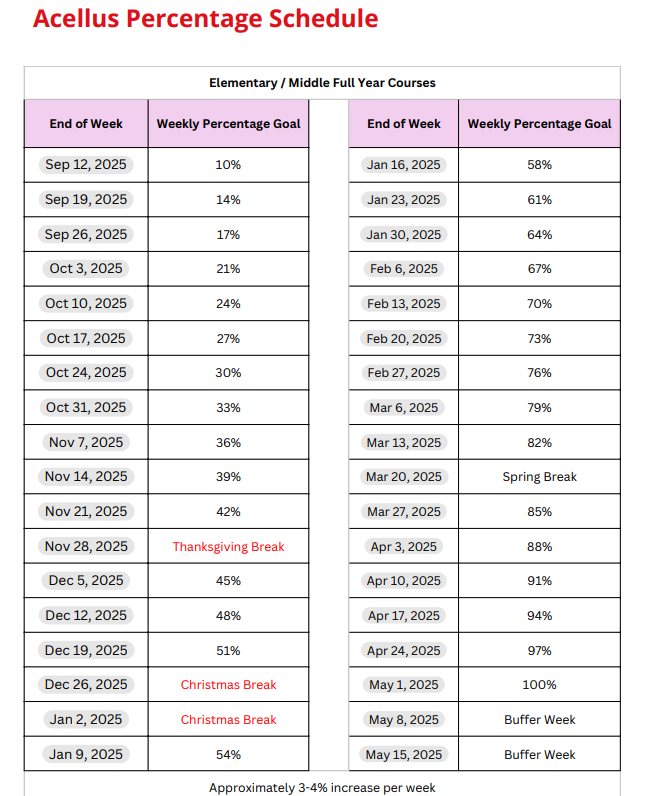
Weekly percentage schedule
Families can use this chart to track expected weekly progress in Acellus.
Need help?
Ask your advisor for login help or account questions.
Use the Acellus Parent Portal to track progress and grades.
Use the ROCS Family Portal for school communications and family-side account tasks.
Use FastBridge only when your advisor or teacher tells you to test.
Contact ROCS support if a page will not open or you are locked out.
ROCS support
About ROCS Elementary
ROCS Elementary supports students with structured online lessons, teacher guidance, family communication, and extra practice tools for reading and math.
Looking for enrollment information instead?
Families exploring ROCS Elementary can learn more about the program or contact the team for help choosing the right fit.